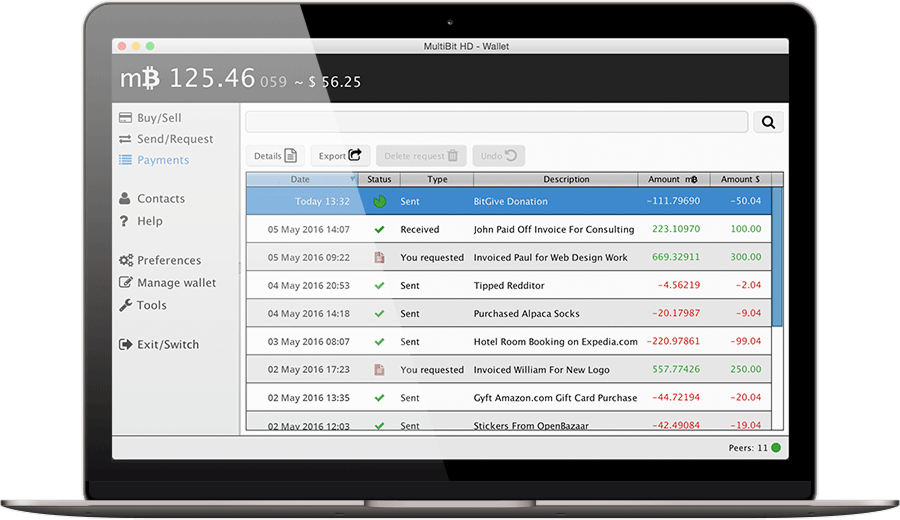
MultiBit Bitcoin Wallet: Lightweight, Secure, and User-Friendly
The MultiBit Bitcoin wallet was developed to make sending, receiving, and managing Bitcoin easier without downloading the entire blockchain. Its lightweight design reduced storage requirements and made desktop wallet management more accessible to users with limited disk space or bandwidth.
The MultiBit crypto wallet focused on straightforward navigation, local control over private keys, and practical backup options. Instead of requiring users to operate a full Bitcoin node, it used Simplified Payment Verification (SPV) to handle transactions with fewer resources.
Two versions define the MultiBit wallet experience: MultiBit Classic and MultiBit HD. Both followed the same lightweight approach, while offering different methods for managing private keys and protecting access to funds.
The History of MultiBit
Released in 2011, MultiBit became known for making Bitcoin more approachable through a lightweight desktop application. The original version, later called MultiBit Classic, provided a simple interface for creating addresses, receiving payments, and sending Bitcoin.
MultiBit Classic used individually generated private keys, making wallet files and private-key backups an important part of managing funds. Users needed to preserve the keys associated with their addresses to maintain access to their Bitcoin.
MultiBit HD introduced hierarchical deterministic key management. This approach derives a sequence of keys from a common seed, simplifying the backup process. Instead of managing each newly generated key separately, users could record recovery words representing the wallet’s seed.
The distinction between Classic and HD matters when choosing backup procedures, identifying wallet files, or reviewing installation instructions. The two versions should not be treated as interchangeable.
Why Choose MultiBit?
MultiBit’s original appeal came from combining a lightweight application with familiar desktop controls. Its design focused on the tasks Bitcoin users needed most: receiving payments, checking transactions, and retaining control over their wallet data.
-
Easy Multibit Download: MultiBit was distributed through installers for Windows, macOS, and Linux. When evaluating a MultiBit download, check the release version, operating-system requirements, and file provenance. Matching the installer to the correct wallet version helps avoid confusion between Classic and HD.
-
Fast Synchronization: MultiBit’s SPV architecture allowed it to synchronize without downloading the complete blockchain. It obtained relevant information from Bitcoin network peers, reducing local storage needs. Synchronization time still depended on network connectivity and the wallet’s transaction history.
-
Secure Encryption: Password protection and encryption helped protect stored private keys against unauthorized access. These protections work alongside backups: a password protects encrypted data, while a usable backup provides a recovery route if the original computer or wallet file becomes unavailable.
-
Simple Interface: MultiBit emphasized a straightforward interface for routine Bitcoin transactions. Receiving addresses, payment amounts, and transaction information were presented through desktop controls, helping users manage the wallet without interacting directly with command-line software.
These features explain the wallet’s design priorities: lower resource requirements, understandable controls, and practical management of private keys.
Multibit Classic vs. MultiBit HD
Although both versions belong to the same project, their backup methods differ.
-
MultiBit Classic: The original MultiBit wallet stores wallet data locally and relies on preserving the relevant private keys. Common recovery materials include
.wallet files and .key private-key exports. Backups should cover all addresses used by the wallet; an older backup may not include keys created afterward. Keep existing backup folders and avoid overwriting your only usable copy.
-
MultiBit HD: The HD version derives keys from a common seed and provides mnemonic recovery words. These words can recreate the underlying keys through a compatible recovery process. They must be recorded accurately and stored securely. Existing encrypted wallet files can also be useful, and a seed backup does not necessarily preserve application details such as transaction labels.
The main difference is how access is backed up. Classic requires preservation of its individual keys or wallet files, while HD simplifies key recovery through a common seed. Both approaches require careful handling of sensitive information.
How to Download and Install
The original MultiBit installation and setup process followed these steps:
-
Locate the appropriate MultiBit release.
Installation began with identifying the correct application: MultiBit Classic or MultiBit HD. Release records and documentation helped establish which package matched the intended wallet version.
-
Select the operating system.
Users selected the installer for Windows, macOS, or Linux and checked the release’s system requirements. The availability of a platform-specific package does not establish compatibility with every version of that operating system.
-
Verify the download.
Where a digital signature was provided, users could verify it against an independently authenticated signing key. Signature verification helps establish a file’s origin and integrity; it does not assess the security of the software itself.
-
Install and launch the application.
After installation, the application opened its wallet interface. Existing wallet files should be backed up before being opened, converted, or modified during any setup process.
-
Complete the version-specific wallet setup.
Creating a MultiBit HD wallet involved recording its recovery words and setting a password. Opening an existing Classic wallet relied on compatible wallet files or private-key import procedures. A Classic backup and an HD recovery phrase require different workflows.
Security Tips for Your Multibit Wallet
Protecting a wallet involves both safeguarding access credentials and preserving usable backups.
-
Verify software sources. Do not assume a download is authentic because its filename, logo, or page title includes MultiBit. Check its provenance against original project records.
-
Use a strong, unique password. Protect encrypted wallet files with a password that is difficult to guess. Store it securely, because an encrypted backup is only useful if it can be decrypted.
-
Back up the appropriate recovery materials. For HD wallets, record recovery words accurately and keep them offline in secure locations. For Classic, preserve wallet files and relevant private-key backups.
-
Keep private information private. Never paste recovery words or private keys into website forms or send them through ordinary messages. Make copies of existing wallet data before troubleshooting, and follow documentation specific to the version and file format involved.
Conclusion
The MultiBit Bitcoin wallet brought together lightweight synchronization, a straightforward desktop interface, and local control over private keys. MultiBit Classic offered file-based wallet management, while MultiBit HD introduced seed-based recovery to simplify backups.
Understanding these differences makes it easier to identify the right documentation, evaluate a MultiBit download, and handle existing wallet data correctly. Whether working with Classic files or HD recovery words, the essential priorities remain the same: verify software provenance, protect private keys, and preserve reliable backups.